


The internet is buzzing about “Business in ChatGPT”. OpenAI released its new feature in beta on November 10, 2026. The ChatGPT business hub allows companies to claim and verify their profiles. Companies can manage their information and track how often ChatGPT links to their websites, displays their profiles, and sends visitors to their pages. This guide provides clear, step-by-step instructions for setting up your profile. It explains the metrics in the hub’s Insights tab so you understand what each metric tracks, what it leaves out, and how to measure your brand's visibility.
The table below defines common terms used in ChatGPT’s Business Hub and in this guide.
| Term | Definition |
|---|---|
| Business Hub | The section of ChatGPT where you claim, verify and manage your profile |
| Insights | The tab tracking mentions, profile views, website clicks, and discovery topics for the last 28 days |
| Mention | An answer where ChatGPT cites a business's website |
| Website click | A click on a website link from inside ChatGPT |
| Discovery topic | A common theme in the answers mentioning or citing your brand |
| Business Agent | An AI assistant that eligible U.S. online businesses build to answer customer questions |
How do you set up a business profile in ChatGPT?
You can set up your business profile in ChatGPT in six steps: open the Hub, find your brand, verify the claim to your brand, complete an identity check with Persona, update your profile details, and open Insights. You need a ChatGPT account and access to a verification method to complete the process.
| Step | Action | Information you’ll need |
|---|---|---|
| 1 | Open Business Hub | A ChatGPT account (preferably a shared business account) |
| 2 | Find and select your listing | Your business name as it appears online |
| 3 | Verify your claim | A business phone number, business email address, DNS domain access, or Shopify login |
| 4 | Complete identity verification | A government-issued ID and proof of authorization |
| 5 | Complete your profile | A company description, business category, logo, cover photo, policies, and product feed |
| 6 | Open Insights | An ownership claim and an approved Persona check |
Please note: Because our team set up our account before writing this article, these screenshots are illustrations rather than original captures.
Step 1: Open Business Hub
Sign in to ChatGPT and click Business Hub in the left menu, or visit chatgpt.com/business-hub.
Figure 1. Open Business Hub from the ChatGPT menu. This diagram is an illustration; replace it with an original screenshot before publishing.
Step 2: Find and select your listing
Search for your company and select the matching listing. Verify the website address and street address on the listing before claiming it, because businesses with similar names can appear in search results.
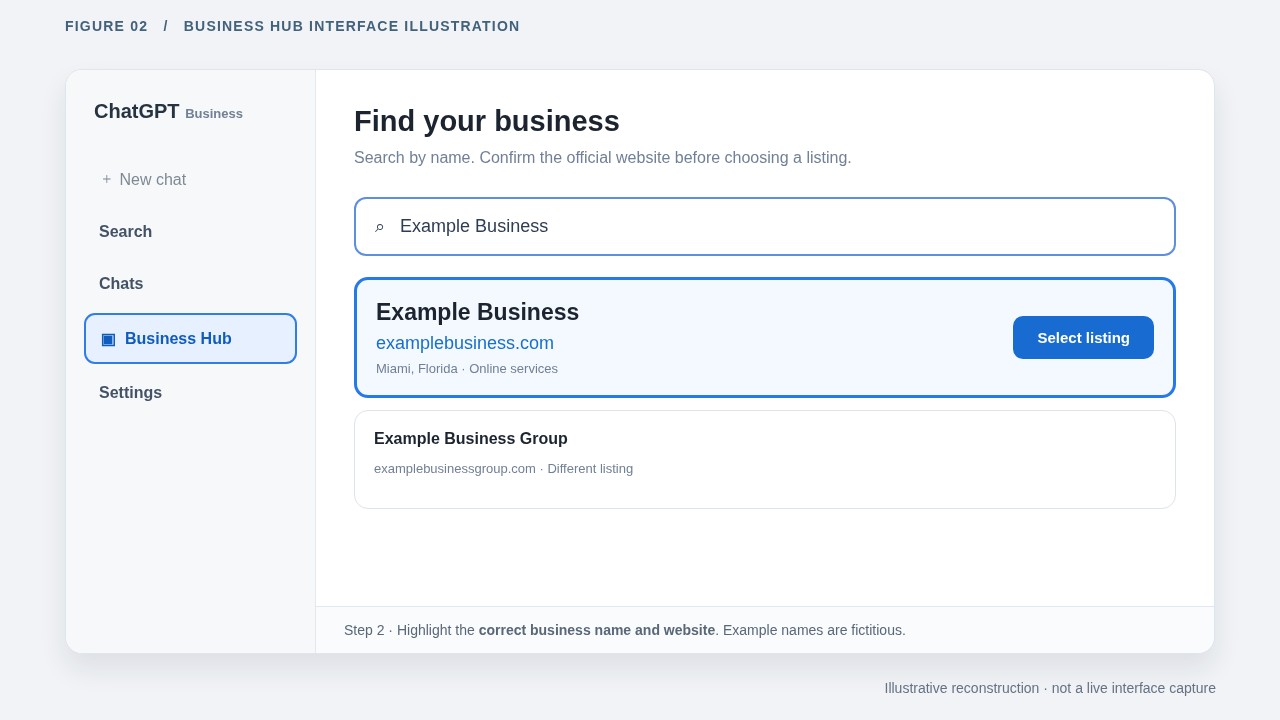
Figure 2. Find your business listing and confirm its domain name. This diagram is an illustration; replace it with an original screenshot before publishing.
Step 3: Verify your claim
The ChatGPT Business Hub offers four main verification methods:
| Method | Action |
|---|---|
| Business phone | Request a text message or phone call, then enter the verification code |
| Business email | Click Get Code, then enter the code sent to your business email address |
| Website domain | Add the TXT record from ChatGPT to your domain’s DNS settings, then click Verify Domain |
| Shopify | Click Connect Shopify, review the requested permissions, and log in to your store |
OpenAI reviews every submitted claim. Once approved, your business appears inside your Business Hub dashboard.
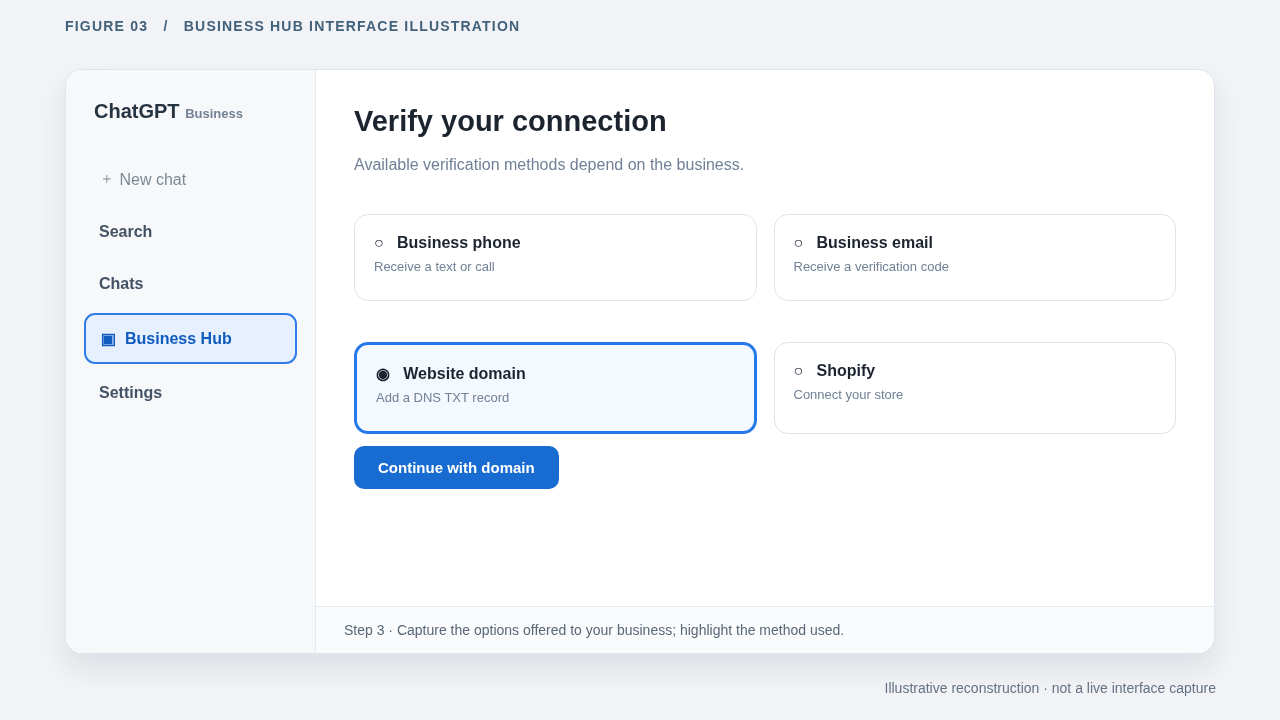
Figure 3. Review the available verification options. This diagram is an illustration; replace it with an original screenshot before publishing.
Step 4: Complete identity verification with Persona
An approved claim lets you view your profile. Completing the Persona identity check unlocks advanced features, such as editing profile details and building a custom Business Agent.
If you skipped the Persona check while claiming your business, click the Business tab, select your profile, and click Complete Verification with Persona.
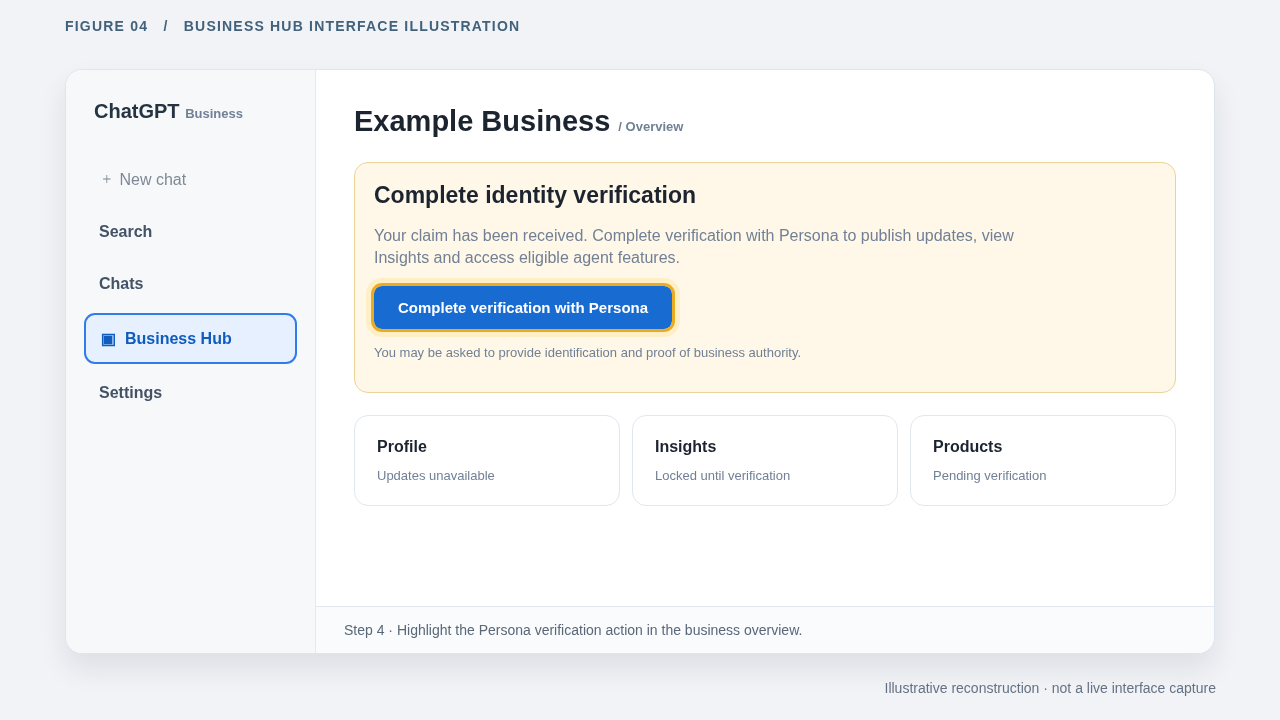
Figure 4. Complete the identity check with Persona. This diagram is an illustration; replace it with an original screenshot before publishing.
Step 5: Complete your profile
Fill in your website URL, description, category, brand logo, cover photo, and return policies to inform customers about your business. Retail stores can connect a product feed to display prices and stock availability. Shopify merchants can link their store directly, while other businesses can upload a product feed file or provide a web URL.
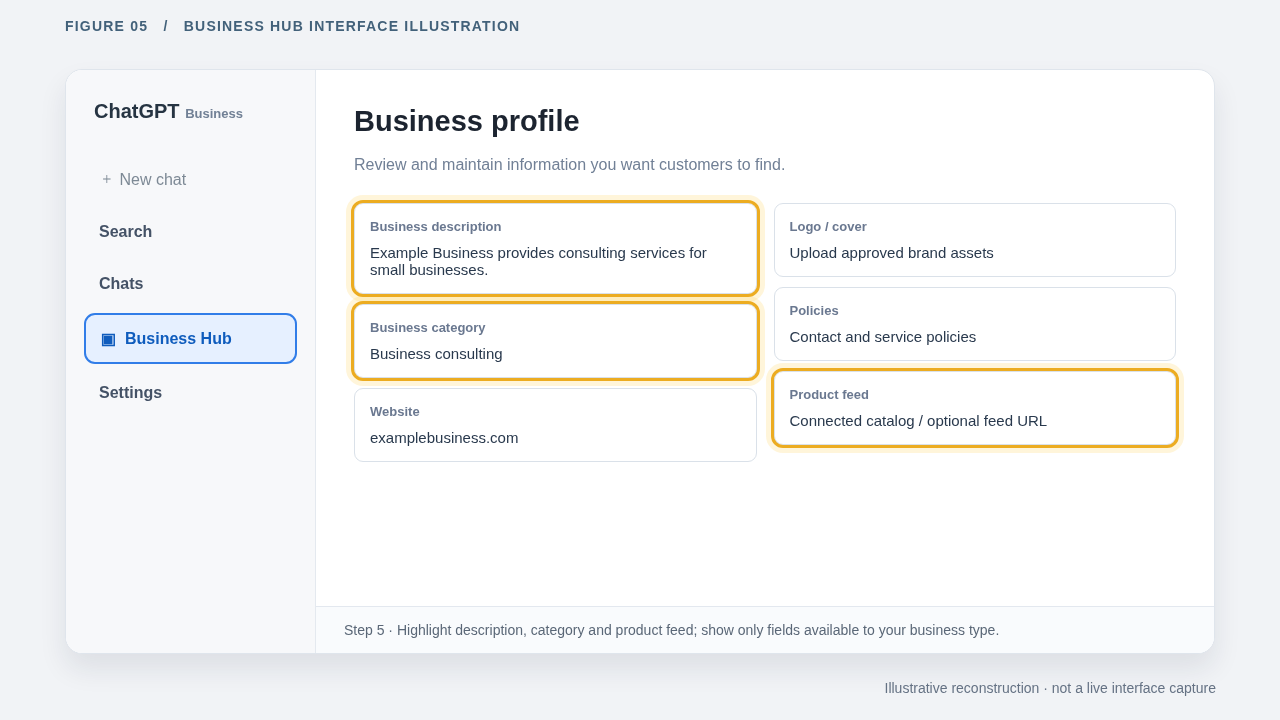
Figure 5. Update your business description, category, and catalog. This diagram is an illustration; replace it with an original screenshot before publishing.
Step 6: Open Insights
The Brand Insights tab displays website mentions, profile views, website clicks, a mentions chart, and the top five discovery topics over the last 28 days. Metrics appear only after user activity meets OpenAI's privacy thresholds, so new or low-traffic profiles may show blank tiles. Account administrators can add team members or grant agency access inside Business Hub.
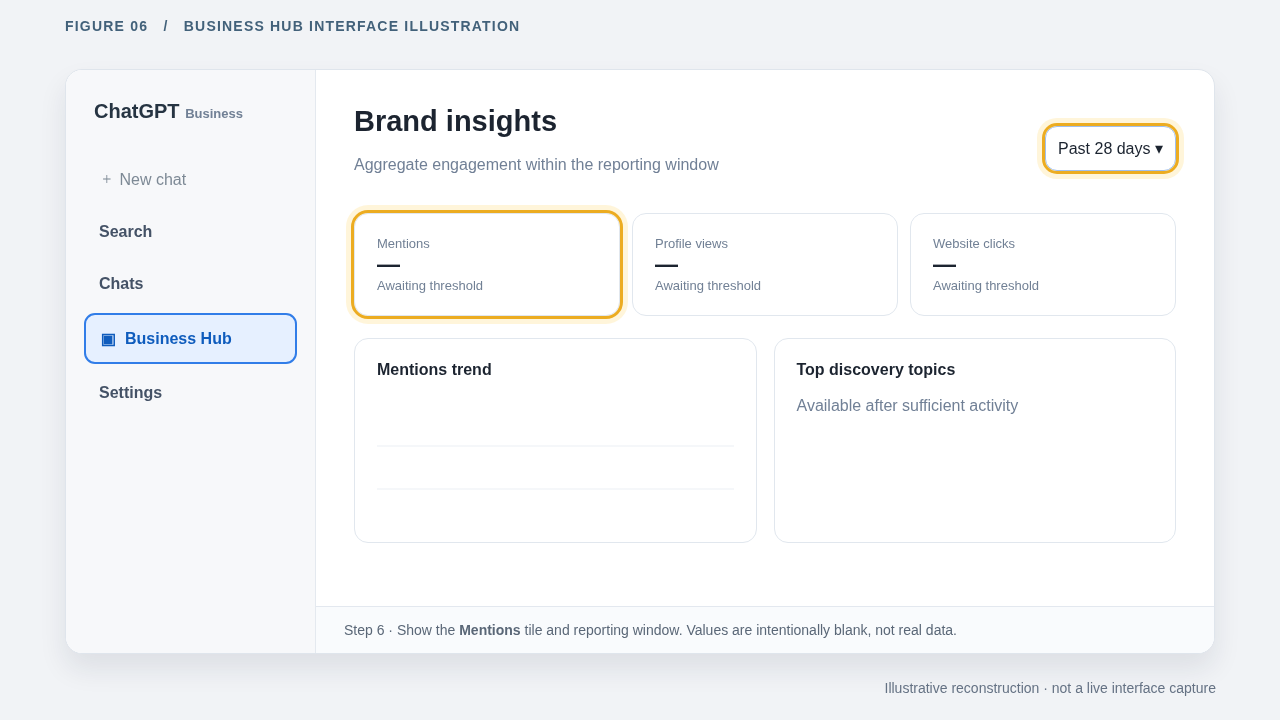
Figure 6. Review your metrics in the Insights tab. This diagram is an illustration; replace it with an original screenshot before publishing.
What does each Business Hub metric count?
The Insights tab in ChatGPT Business Hub tracks four metrics across a rolling 28-day window. The definitions below come from OpenAI's setup documentation.
| Metric | What Business Hub counts | What it leaves out |
|---|---|---|
| Mentions (online business) | Answers in which ChatGPT cites your l website | Answers recommending your brand without a link, or answers linking to a third-party site |
| Mentions (local business) | Answers in which ChatGPT displays your physical store location | Whether users clicked to view your location details |
| Profile views | Views of your business profile in ChatGPT | Actions users took after viewing your profile |
| Website clicks | Recorded clicks on links to your website inside ChatGPT | Completed website visits and product purchases |
| Discovery topics | Common topics in answers referencing your business | The exact prompts or questions typed by users |
How many brand mentions does Business Hub leave out?
A recent study by Profound analyzed 37,842 brand mentions in ChatGPT. The study found that 45.1% of brand recommendations linked to third-party sources, such as online retailers, rather than the brand's website.
| How ChatGPT mentioned the brand | Share of 37,842 mentions | Counts in Business Hub? |
|---|---|---|
| Recommended the brand and linked to the brand's website | 54.9% | Yes |
| Recommended the brand without adding a link | 40.2% | No |
| Recommended the brand and linked to a third-party site | 4.8% | No |
The percentages in the table sum to 99.9% due to rounding.
Treat your Business Hub mention count as a minimum estimate. At a 54.9% capture rate, ChatGPT mentions a brand roughly 1.8 times for every single mention recorded in the Hub. For example, a Hub total of 1,000 mentions means ChatGPT cited your brand in approximately 1,820 answers (1,000 divided by 0.549).
Your brand's actual ratio depends on how often ChatGPT links directly to your website when recommending your products. Use 1.8 as a baseline multiplier.
Because Business Hub is in beta, tracking methods may change. ChatGPT tags brand recommendations within its answers. If OpenAI links more of those tags to brand sites, your Hub metric will rise even if your recommendations stay the same.
How does a retailer link differ from a direct business link?
For online businesses, a reference to your website counts as a mention in Business Hub. A product link pointing to a retailer won’t count as a mention for your brand. ChatGPT can cite your brand in both types of response, but only website references update your metric.
Here are two examples from recent live search sessions:
Example one: ChatGPT links to retailers
In the first chat, the user asks, "I need an affordable vitamin C serum, what do you recommend?" ChatGPT recommends four products and links them to a third-party retailer.
| ChatGPT Recommendation | Product card links to | Sources cited by ChatGPT | Counted as a mention in Business Hub? |
|---|---|---|---|
| CeraVe | Target | NBC News and one other source | Pending source verification |
| e.l.f. SKIN | Walmart | Allure | No |
| Vanicream | Walmart | None shown | No |
| Timeless Skin Care | Nordstrom | None shown | No |
Because none of the links point to the brand websites, Business Hub records no mentions (or clicks) for these brands.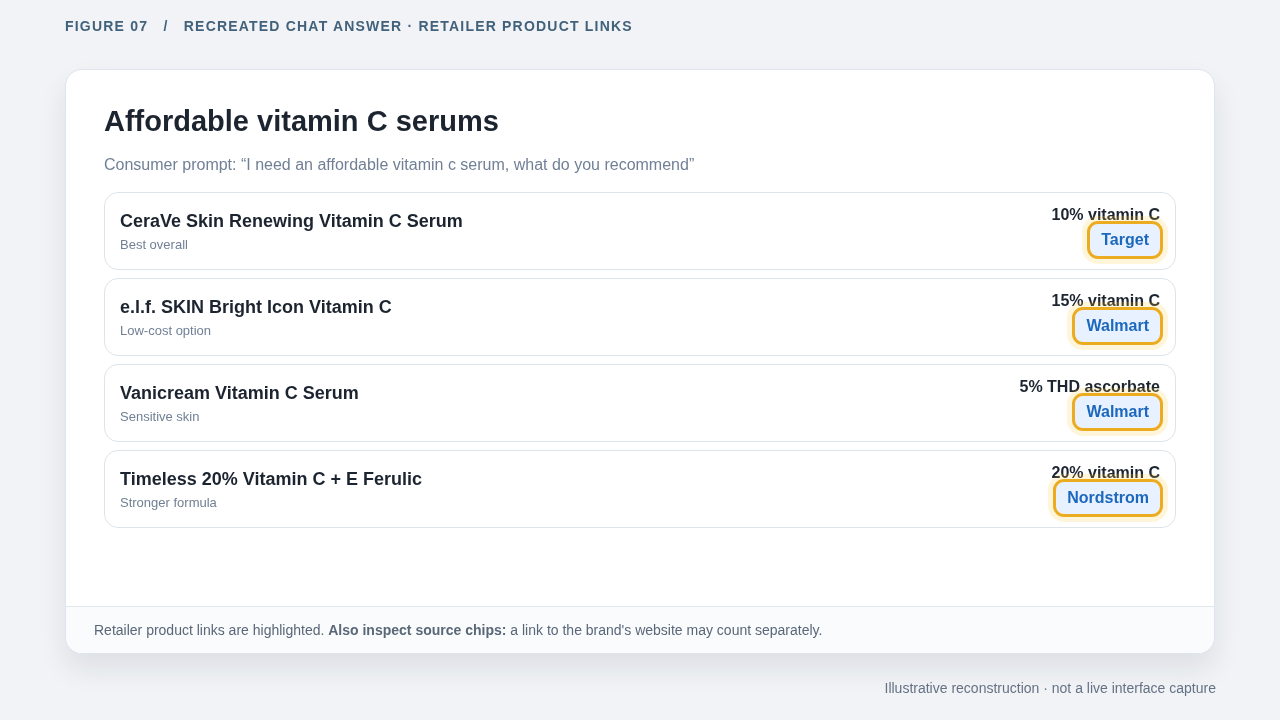
Figure 7. Retailer links appear in product recommendations. Check source links to verify whether Business Hub counts a mention. This diagram is an illustration; replace it with an original screenshot before publishing.
Editorial check: Open the CeraVe source chip and confirm whether the second link points to cerave.com.
Example two: ChatGPT links to the business's website
In the second chat, the user asks for "a good private school in Miami that teaches AI to middle and high school kids." ChatGPT recommends three schools, and each shares the school's domain and website.
| ChatGPT Recommendation | Link in the answer | Mention in Business Hub? |
|---|---|---|
| Ransom Everglades School | Source link pointing to ransomeverglades.org | Website reference* |
| Palmer Trinity School | Website link pointing to palmertrinity.org | Website reference* |
| Miami Country Day School | Website link pointing to miamicountryday.org | Website reference* |
These website links satisfy the mention rule for online business profiles. For local business profiles, OpenAI counts map locations shown to users; website clicks are recorded separately. It’s important to check URL parameters and landing pages when evaluating referral traffic.
ChatGPT’s response displays the schools on an interactive map. For profiles claimed as local businesses, ChatGPT counts a mention when it shows a business location in response to a user’s search.
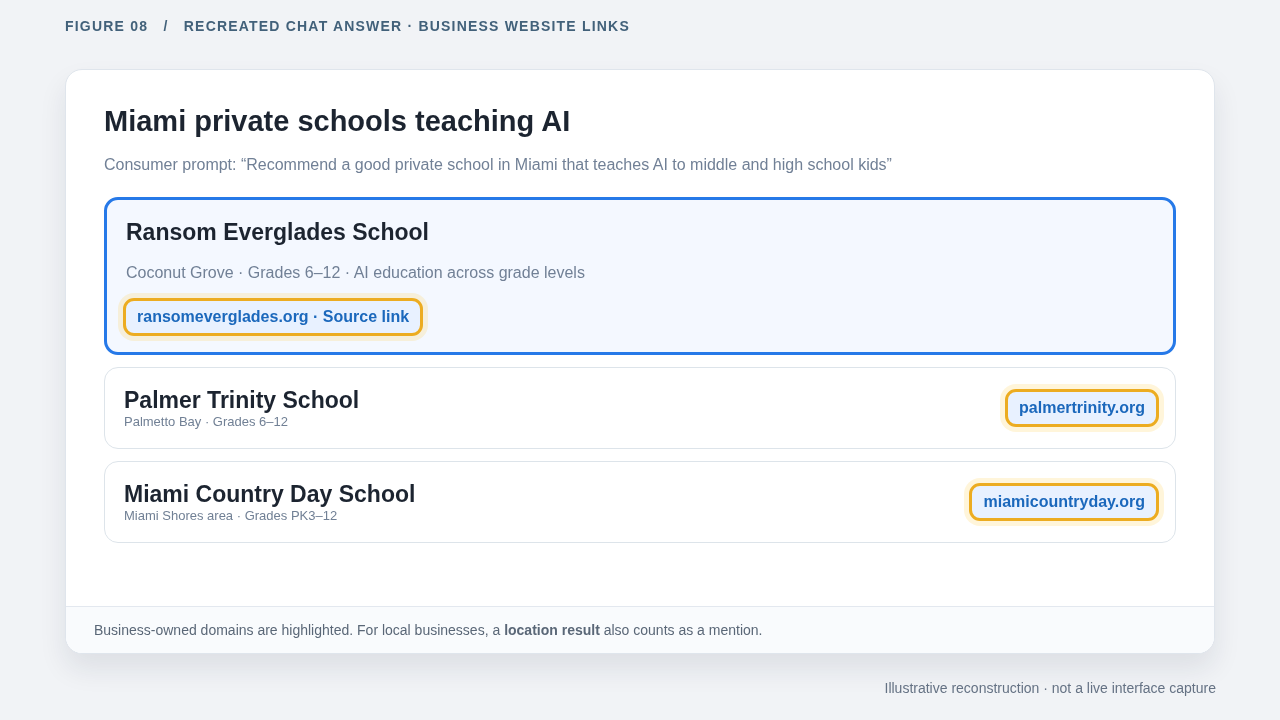
Figure 8. school websites appear in recommendations. Local business mentions follow separate rules. This diagram is an illustration; replace it with an original screenshot before publishing.
Counting distinction: Online business mentions require website links; local business mentions require map locations.
What the two search examples mean for your data
| Link Type | Example Scenario | Destination | Is The Mention Counted | Is The Website Click Counted? |
|---|---|---|---|---|
| Business Link | Ransom Everglades School link pointing to ransomeverglades.org | Brand's official website | Yes | Yes (if clicked by user) |
| Third-Party Retailer Link | CeraVe serum link pointing to Target product page | Retailer product page | No (unless official site is cited as a source) | No (traffic goes to retailer site) |
| Unlinked Text Mention | Brand is mentioned in response text without a link | None | No | No |
To evaluate a response, check link destinations, product cards (the blocks that share product recommendations and details in an AI answer), source citations, and websites.
These two examples highlight why link destinations and business types matter. The school recommendations link to their websites, whereas the vitamin C recommendations link to retail stores.
Brands that rely on third-party retailers have a higher proportion of retailer links, which means many of their brand recommendations fall outside Business Hub metrics. Profound’s recent 37,842-mention study calculated that third-party links made up 4.8% of all brand references across product categories. Compare your Business Hub data with your sales reports and third-party tracking tools to get a better picture of your visibility.
How should you report Business Hub data?
Label the Hub's mention count as "ChatGPT Website References" in your reports to match OpenAI's measurement rules. Follow these four best practices to maintain accurate data:
1. Claim and verify your business. Insights remain locked until OpenAI approves both your ownership claim and your Persona verification.
2. Use accurate metric labels. Title the metric "ChatGPT Website References" and include OpenAI's definition in a footnote.
3. Track metric baselines. Record your mentions, profile views, website clicks, and top discovery topics for each 28-day window alongside the tracking date.
4. Compare data sources. Track brand references using a prompt-monitoring tool and compare those results against Business Hub totals. The difference represents recommendations mentioning your brand without linking to your site.
A low metric in Business Hub indicates that ChatGPT rarely links to your website but it doesn’t mean it rarely recommends your brand.
Frequently asked questions
Does claiming a ChatGPT business profile increase visibility?
No. OpenAI clarifies that claiming a business profile doesn’t change its ranking or visibility in ChatGPT. Claiming your profile allows you to update company details and access Insights.
Does it cost money to claim a business in ChatGPT?
No. Eligible companies can claim a business profile without purchasing an Enterprise subscription or buying ads. Enterprise customers and advertisers can claim profiles through their OpenAI account managers.
Why is my Business Hub mention count lower than my tracking tool's count?
Business Hub records a mention for an online business only when ChatGPT links to the company's website. External tracking tools count all answers that mention a brand without a link.
Does a link to a retailer count as a mention for my brand?
No. When ChatGPT recommends your product and links to a third-party retailer, Business Hub won’t document a mention or click.
Why are my Insights tiles blank?
Business Hub displays data after user activity meets OpenAI's privacy thresholds, and after OpenAI approves your ownership claim and Persona check.
Can an agency manage a ChatGPT business profile?
Yes. The administrator who claims the business can invite team members inside Business Hub and grant external agencies permission to manage the profile or its AI agent.
In summary, setting up a ChatGPT business profile involves six steps. For online businesses, the mention metric counts website references, not links to third party sites like a retailer. Claim your profile, report your metrics and compare your data against any external third-party trackers. Always remember to verify source citations before publishing statistical claims.